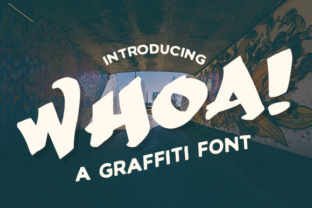
Whoa: A Bold and Impactful Font for Eye-Catching Headlines
If you're looking for a font that commands attention and makes a statement, Whoa is the perfect choice. Designed by Johan Waldenstrom, this graffiti-style script font is as striking as its name suggests. With its dynamic curves and energetic feel, Whoa brings a sense of movement and intensity to any design project. Whether you're creating a poster, a logo, or a social media graphic, Whoa can elevate your work with its unique visual appeal.
What sets Whoa apart is its ability to blend the raw energy of street art with the elegance of a well-crafted typeface. This font isn’t just about style—it’s about making a lasting impression. Its bold strokes and irregular shapes give it a hand-painted look that feels authentic and powerful. For designers and creatives, Whoa offers a fresh alternative to more traditional fonts, especially when used in headlines and titles where impact matters most.
Why Whoa Stands Out Among Script Fonts
While many script fonts aim for a classic or elegant look, Whoa takes a different approach. It’s not meant for body text or long paragraphs—it’s designed to be seen. Its irregular spacing and uneven lines mimic the chaotic beauty of real graffiti, making it ideal for projects that need a strong visual identity. However, this very feature can also be a point of confusion for users who aren’t familiar with how to use it effectively.
One common mistake is trying to use Whoa in large blocks of text. The font’s irregularity can make it hard to read when used in extended passages, which can hurt readability and weaken the message. Instead, it’s best reserved for short phrases, headlines, or logos where its visual impact can shine without compromising legibility.
Misconceptions About Using Whoa Effectively
Some users assume that because Whoa is free, it’s automatically a good fit for all projects. While availability is a plus, it’s important to consider how the font aligns with the overall design and purpose of your work. For example, using Whoa on a professional business website might not be the best choice if the tone of the site is more formal or corporate. The font’s edgy style could clash with the brand’s image, leading to a mismatched and unprofessional appearance.
Another misunderstanding is that Whoa works equally well in all sizes. In reality, the font’s details are more visible at larger sizes, such as in headlines or banners. At smaller sizes, the irregularities can become distracting or even difficult to read. This means that careful consideration of font size and placement is essential to achieving the desired effect.
How to Avoid Common Pitfalls When Using Whoa
To get the most out of Whoa, start by testing it in different contexts before committing to a final design. Try using it in various sizes and layouts to see how it performs. If you’re unsure, pair it with a simpler, more readable font for contrast. This helps balance the visual weight and ensures that the message remains clear and accessible.
Also, pay attention to the background and color scheme. Whoa’s bold strokes can stand out against dark backgrounds, but they may not be as effective on light or busy backgrounds. Experimenting with different color combinations can help you find the best way to highlight the font’s strengths while maintaining visual harmony.
Key Considerations Before Using Whoa
Before downloading or applying Whoa, ask yourself: What is the goal of the design? Who is the target audience? How does this font support the message? These questions can help you determine whether Whoa is the right choice for your project. If the answer is yes, then consider how to use it strategically to enhance, not overwhelm.
Additionally, check the licensing terms. Even though Whoa is free, there may be restrictions on commercial use or redistribution. Make sure you understand the terms to avoid legal issues down the line. Always credit the designer, Johan Waldenstrom, when appropriate.
Real-World Examples of Effective Whoa Use
Imagine a music festival poster that needs to grab attention quickly. Using Whoa for the event title would add energy and excitement, drawing the eye and conveying the vibe of the event. In this case, the font’s uniqueness enhances the overall design rather than detracting from it.
On the other hand, using Whoa for a company’s annual report would likely be a poor decision. The font’s informal and chaotic nature doesn’t match the professionalism required for such a document. Here, a more structured and clean font would be a better fit, ensuring clarity and credibility.
Final Thoughts on Choosing and Using Whoa
Whoa is a powerful tool for designers who want to make a statement. Its bold, graffiti-inspired style offers a refreshing alternative to more conventional fonts, especially when used in titles and headlines. However, like any design element, it requires thoughtful application to achieve the best results.
By understanding its strengths and limitations, you can avoid common mistakes and use Whoa in a way that enhances your work. Whether you're a beginner or an experienced designer, taking the time to experiment and refine your approach will help you unlock the full potential of this striking font.